Local Tech Repair: Spyware

Pages

Showing posts with label Spyware. Show all posts

Monday, January 16, 2012

Removing xp,vista, win7 antivirus 2012

Right after the new years the place were I work got hit with computers all having different variants of the fake antivirus 2012. This variant renames it self depending on which version of windows you have. But like most fake antivirus software they try to steal your credit card info and personal information. So here is how you remove it.

This is what you may be seeing depending on the version of windows you have.

1. So if you see this don't try to manually remove any of the files it lists. They are fake and you could be removing non infected files.
So what we will need is a few programs. on a sperate computer download these programs to a flash drive.
Malwarebytes
Spybot Search & Destory
SuperAntiSpyware
RKILL
ComboFix
TDSSKiller

Once you have your software downloaded and on a USB.

2. Start the infected computer in safe mode with networking. (hitting F8 during start up)

3. run RKill and wait for it to finish

4. then install malwarebytes, spybot, and superantispyware. then update and run full scans this will take a few hours.

5. Once scans are finished and items found are now fixed we can restart the computer into normal mode.

6. Run comodofix... this will take a while and it will tell you when it is done. if you need help they have a guide to walk you through it (http://www.bleepingcomputer.com/combofix/how-to-use-combofix)

7. once that is finished you can run TDSSKiller to make sure everything is clean.

8. Run Registry cleaners CCleaner and Registry Mechanic

9. Uninstall malwarebytes, spybot, superantispyware, comdofix, ccleaner, and registry mechanic. Less you want to keep some of them

10. You now are finished.


I hope this helps you get your computer working again.
if you are wanting to help prevent these things in the future. keep windows updated, use firefox or chrome, install WOT plugin, and keep your antivirus updated.
If you need an antivirus software one of the top rated by AV-test.org is Bitdefender for xp,vista, and windows 7 beating away the competition.

if you rather have a free antivirus check out Avast

Thanks for reading,
Local Tech Repair Admin

and leave a comment...

Saturday, July 16, 2011

Avast Free AntiVirus Results

Avast is a low powered power house when it comes to virus protection. First off I don't know if results are fully accurate as some of the virus links went dead sense the first part of the tests but after adding more it still did well.

Avast performance wise is not that bad as it runs at ~50mbs of ram while idle and does not very much while actually scanning. The software did well when I was surfing the net trying to download viruses using IE8 though on known bad sites the software would block the download of the known viruses not even giving it a chance to get in temp directory to do havoc. On top of that avast redirects you to their page telling you that you just dodged a virus and tries to sell you on upgrading your free version to a version with more bells and whistles. Though on the positive note avast did not allow me to bypass the block like some other virus scanners did when they did warn you about a site.

On scan it did not pick up any viruses which surprised me a little though sense it did block downloads it did not allow many to get a foothold. While in herins boot cd avira did not pickup anything though SAS did pick up 2 variants of a fake antivirus. While malwarebytes did not pickup anything spybot did pickup a pup that every other virus scanner also did not pick up.

Overall avast did well enough to go to round two with the other better virus scanners to go in to more testing. AV-Test.org has their results here if you want more information from their tests.

So far avast has done the best out of the virus scanners both detection rate, prevention, and performance in low memory situations.

Hope this helps and will do more testing later,
Local Tech Repair Admin


Monday, July 11, 2011

Avira Antivir Personal 2011 Review – Benchmark Windows XP

Today I am testing out Avira Antivir Personal and seeing how it holds up compared to other anti-virus suites out there. Avira AntiVir Personal has a fairly simple display and for a free anti-virus it I was hopping for a ok performance both detection rate and also hopefully having a low resource requirement.


I just want to start off by saying that I am not really impressed with how well it works. Avira is the software the company I work for uses for their virus removal off of Hiren's Boot CD. So I figured it be good for a dedicated virus scanner on the windows side.

Results:

While testing Avira with their Guard activated I used IE8 to surf the web to known predetermined websites that hosted a wide verity of bad software. Most the sites that I downloaded viruses from did not get stopped by avira in their active scans I only had 1 active block from an active x virus sense active x was enabled across all websites. Avira only stopped one virus from installing and only one virus from running after it installed. Which total 3 viruses in all during avira's active guard.

On the other hand during the scanning Avira did pick up one more virus in a 14min scan. This is not the best seeing that the computer still has many more viruses installed and spyware and spamware. So lets compare this to others to see how much they truly did miss.

Hiren's Boot CD
avira: 0
superantispyware: 3
normal mode:
comodofix: to many to count over 20
malwarebytes: 1
spybot S&D: 1
Sophos: 0


Conclusion:
Avira did protect against some of the more nasty viruses on the list though did miss many adware and rootkits and fake anti-virus software. Though sense it was able to pick up active x viruses and stop a few of them it is on the same level as AVG but with out a any warning on the web for if your going to a bad website or not. Still this is still better than what we have on our low end of clamwin.

Thanks for reading,
Local Tech Repair Admin


AVG Internet Security 2011 Review for Windows XP

AVG is a popular anti-virus software along with others like Norton and McAfee. So I decided to see how well it did compared so some other anti-virus software. I decided to test the AVG Internet Security 2011 instead of the free version because they gave a free 90 day trial to see how well it works and I wanted to see if it worked. I will go back and try again later with the free version to see the difference between the two.

If you have not read the first review check out it here:
http://localtechrepair.blogspot.com/2011/07/clamwin-and-clam-sentinel-review-on.html
this gives detail on what links I used for the malware.

Performance:
I just wanted to start out by saying that AVG Internet Security 2011 did not pick up every virus and malware so even the paid version still needs help by other things like spybot, malwarebytes, or/and superantispyware. But it did do a lot better than clam did to say the least.

AVG has some nice features like integration into the web browser to help warn people of virus infected sites. This should help some of the less techy people out there see a visual sign that something is wrong. Though only one of the sites did it not let me at all go to the site where the others gave me an option to bypass the warning.

AVG was able to block some of the applications from installing in the first place with is good for prevention though it did not prevent all of them. It was only able to block 4 while they where trying to install. This is better than nothing but not perfect either. It was able to detect running processes after some of the viruses where installed (5 of them). This is nice but I would rather of had it block it before it was installed but still did not make me have to scan for them.

While scanning it did a whole system scan and was able to find 1 infected file and 4 warnings which where corrupted exe from viruses that tried to download. The scan for a 10 gb hard drive took ~13mins.
AVG gives you the option of the priority that you want the scan to go I left it at the default for the scan though giving it high priority would probably speed up the time but make it less likely for the user to work on the computer while scanning.

Though AVG did not pick up everything and could not uninstall everything.

While running in Hiren Boot CD I ran different tests to see what it missed.
Superantispyware was able to find 4 adware and 1 rootkit and remove them.
Avira was able to find 5 infections.
Normal mode:
Malwarebytes found 12+2 = 14
Spybot Search & Destory found 1


AVG Internet Security 2011 missed a total of ~24 malware/virus and possible more that the programs above did not find.


Conclusion
AVG did a fairly good job and probably would have don't a lot better if we listened to the warnings that they gave while on the Internet we may have been in a better place. Though this still has room to grow in its protection of viruses sense the internet is not the only one place that can give you viruses. The performance of the scan speed was not bad at all compared to that of clam. Though on the performance of the the software on the ram side while idle the software was using 230MB of ram while scanning on default mode it was using 334MB of ram and while on High Priority scan it used 375MB. For a slow computer this may be acceptable but it depends on the users. Though for a windows xp computer with a half a GB of ram this and other things starting up this may be little to ram heavy for those computers.


Thanks for Reading,
Local Tech Repair Admin

ClamWin and Clam Sentinel Review on Windows XP

Clamwin is a version of ClamAV for windows. Though clam does not have active protection this is where clam sentinel comes in providing active protection for the clam definition database. So trying out clam to see if it really holds up to some of the things that viruses can throw at it we will see if it is worth even trying.


The list of viruses are from the following links.
-----WARNING REAL VIRUSES-----
adeliminator.net
http://www.thevalidatecheck.com/fr_ipd3/MjAxMTA3MTAtNzYuMTE1LjI0OC4xNjk=/index.php?web_id=CD4099&muid=MT-4e1a64ed4d383-3659
http://www.anti-spyware-101.com/download-sph
http://www.top20free.com/wallpaper.html
http://www.keygenguru.com/
http://spywarezapper.com/
http://www.rocketdownload.com/program/serial-keys-recover-215490.html
http://www.topwallpapers.com/
freevirusprotection.org/
www.free-antivirus.info/anti-virus/avg-antivirus-free-edition.html
www.newfreedownloads.com/find/adware-removal.html
www.freechristmasscreensavers.com/animatedsavers.htm
www.ihateadware.com/
www.freechristmassavers.com/
www.fasterpccleanclean.com/remove-rootkit-win32-agent-pp
http://www.reimage.com/lp/nhome/dyn.php?tracking=ga1&banner=6.1_Content_US&adgroup=Malware&ads_name=728x90_spyware_new_lp8&keyword=Spyware&lpx=LP-8
www.handyarchive.com/free/rootkit-web-bug-worm-eliminator/
---------WARNING REAL VIRUSES DON'T GO TO--------------


So while visiting these sites and and allowing the active x to run all these sites. I never received any popups warning me of possible infections or any warnings on a default install. This could possibly been fixed if I turned on warn on suspicious activity though this is not turned on by default. After trying to run in normal mode spybot, malwarebytes, and superantispyware and all of them being killed by the viruses I decided to try safe mode to see if it made any difference. And it did not.

Detection Rate for Default mode for clamwin is 0%


To see if clam will pick up any off them I tried to run it under hirens boot CD to see if the definitions would work. While in Hirens Boot CD Clamwin was able to find 1 virus after a ~31min scan of a 10GB hard drive. Where by comparison avira picked up 5 in 9 mins from hiren boot cd. And superantispyware found 5 more on top of that in 14mins. ClamWin is a non effective virus protection it could not prevent any viruses from being installed and it could barely find any when there was some.

My Rating of this small virus scanner is a complete fail for both boot scanning and active windows scanning.

Sunday, July 10, 2011

The Best Free Anti-Virus Comparison - Clamwin VS McAfee VS Norton VS Avira VS AVG and More

I have always wondered if clamav is really that bad of a virus scanner compared to others in the industry. Researching on the web I hear a lot of people bashing their definitions database saying that it is worthless but I could never find any comparison between it and other virus scanners. When virus scanners are compared I normally look at av-test.org to see which one is the best for the year. But they don't test clam in their tests. So I figured I do my own test.
So here is what I am doing. I have a virtual machine with windows xp fully updated to the current updates (7-10-11). I will have one antivirus on the OS with nothing else. So it is only the virus scanner and the OS fully updated. I will be using IE for getting the viruses and then doing a virus scan with the virus scanner and seeing how many it picks up and how many it actively blocks. Then I will delete the Virtual Hard drive and start over with a new .vdi (I am using Virtual machine for the VM).

The First Anti Virus I will be testing is Clamwin with clam sentinel for the active scanner sense clamwin does not have a real time scanner. After that I will test it against some of the most common free anti-virus software out there so the free version of AVG, Avira, McAfee, Norton, and More (Post a link to one if you want it tested). After all the tests I will write a conclusion article summarizing the statistical information. All virus tests will also have the same viruses installed (or tried to be installed.)

If you have any suggestions let me know and I will try to do what I can. Each Anti-virus scanner will get their own post with their results.

Looking forward to your commons,
Local Tech Repair Admin


Test Results:
Avira
AVG
ClamWin and Clam Sentinel

Saturday, July 9, 2011

How to Prevent Viruses in a Low Memory Situation

Lots of older computers have a problem with memory. I am fixing a computer right now that had malware on it and only a half GB of ram. This computer was running a full antivirus suite from McAfee though the only problem is the computer was incredibly slow.

I mean really really slow. The OS was windows xp and the OS it self was taking up ~200 MB just to run the OS and on a default start up with McAfee running it was running around ~600MB which is a bad thing. McAfee was taking up almost the whole ram that was on the computer leaving nothing to be used by the computer OS or any application.

So after uninstalling McAfee the computer ran a lot faster probably 10X as fast. But the only problem is the computer did not have any anti virus software anymore. So I looked for a alternative antivirus that offered real time protection. What I cam with is clamwin this uses a lot less ram than Immunet 3.0 that you get from clamav.net which used 200MB of ram so still to much for a computer with only a half GB of ram in them. The only problem is that clamwin does not provide real time protection. So I needed to fix that to help pro actively prevent viruses.

So the solution is Clam Sentinel. This solution is not the best seeing that the clam database is not the most complete but it is the only low memory solution that is fitting for low memory computer. Running clamwin and clam sentinel only uses ~20mb of ram this helps the computer be able to do other things like running firefox with out having to use the hard drive as virtual ram which slows the computer down a lot.

Hope this Helps some,
Local Tech Repair Admin

Thursday, July 7, 2011

Rootkit Removal Tools By Wonky

When your computer gets a virus, that virus tries to spread, and eventually it will damage the host making it much easier to detect. A rootkit on the other hand is designed to hide certain elements such as files, processes, registry entries, or network connections, from the user and other programs thus making it very difficult to detect. This technology can be used for good as well as malicious purposes so it is important to be familiar with your computer to avoid deleting these legitimate objects. Within Windows rootkits are used to hide malware so that their execution goes unnoticed by your security applications. So imagine that a rootkit has been installed on your computer and that its purpose is to hide a virus, thus giving the malware time to complete its goal, steal your data, and damage your system all the while going undetected. Unfortunately, rootkits are extremely effective at this, which means that even though you may believe your PC to be totally clean, some of you could be infected right now.

Most of the anti-virus vendors have integrated anti-rootkit technology into their more recent products. However, this is not a fool proof solution against rootkits because just as the AV companies improve their products detection abilities, so the malware creators find new ways to avoid detection. So as security conscious users we must rely on third party tools to help us, and there are several free applications which specialize in the detection and removal of rootkits. Keep in mind that none of these products will detect every single problem, so it is always a good idea to keep more than one of them to hand.

here are a lot of anti-rootkit programs available, a lot of this software is very advanced and requires an experienced and technical minded user who is familiar with computers and operating systems. However, there are a couple of options that do not require much technical ability and are also very effective.

At the top of the list is Sophos Anti-Rootkit. The program has a small but easy to use interface with no options other than choosing where you want to scan. As it scans it opens up to a slightly larger interface where it lists the results of the scan and gives you information about each result as well as a recommendation for them. Additionally, a small help file is available that explains the program in a little more detail and gives directions on how to use the command line anti-rootkit tool which is also included. For all Windows users, Sophos offers an easy and very effective choice in rootkit removal, that is suitable even for beginners.

I have two top choices for all the experienced and technical users because I find it impossible to choose one over the other. GMER and RootRepeal are very popular applications, and they are definitely my favorites, but it takes someone pretty knowledgeable about computer systems to be able to interpret the results. You can find a lot of documentation on both programs but if you are the type of person who likes to click the scan button and simply wait for the results, you would be better served with either Sophos or F-Secure Blacklight.

F-Secure Blacklight Rootkit Eliminator is another great tool for rootkit removal. Unfortunately, support for it ended a couple of years ago or it might have been my top pick. However, you can still download it on the F-Secure web site and it is compatible with Windows Vista and XP.

Windows Vista and XP users should download a copy of this great program because even though it is not supported anymore, it is still one of the best rootkit removal applications available.

The next product that I looked at is one that I always keep in my toolkit. Dr. Web Cure It is not a standalone anti-rootkit tool like the other tools I recommended, rather it is a free malware scanner and removal tool that happens to be pretty effective at removing rootkits. It is always a good idea to have more than one tool capable of removal, so Dr. Web's freeware scanner is a great addition to anybody's arsenal because it removes more than just rootkits, and it does this very well.

Sometimes the only symptoms you will get from rootkits is an increase in network traffic, or a decrease in performance, and maybe an unknown process running. So with today's high bandwidth networks, and high performance computers it can be very hard to notice any signs. Prevention is always the best practice, but detection is just as important so make sure your AV has anti-rootkit capabilities, and make sure you have a good Firewall and HIPS combo. This and a combination of the tools I have mentioned are the best approach toward keeping your computer free of rootkits.

The free version of Prevx offers the same class leading real time detection of the full version, unfortunately it doesn't offer much more than this. Prevx Free is only capable of cleaning select infections, such as Adware, the ZEUS banking trojan, and MBR rootkits. When dealing with rootkits detection is definitely very important, so even if you can't clean all infections you might at least be alerted, enabling you to take further action and manually remove the rootkit or seek help in doing so. As hard as it is detect the newer, ever evolving rootkits and viruses, Prevx can be a very powerful and informative addition to your regular anti-virus software.

Additionally, Prevx Free can run customized scans from the context menu and also gives you the ability to schedule scans in the GUI to help assure that nothing has gotten by your normal security software. On my 320 GB hard drive a deep scan takes about three minutes on average. The free version also offers protection of stored cookies as well as protection for all of your saved credentials. There is also a browser protection component in the free version but it only offers custom protection on only one web site of your choice. It does however, give the full Prevx Safe Online protection, which includes anti-phishing, protection against hijacks, keyloggers, and cookie stealers for a number of popular websites such as PayPal, CleverBridge, or Amazon and of course the one website of your choice.

While the free version of Prevx can not clean a lot of rootkits, it can effectively warn you about new infections. Prevx is inherently built on their anti-rootkit technology, and has consistently been one of the first vendors to detect new rootkits. I believe that this application can play a very important role in keeping your computer clean of all infections, after all, you can't remove what you can not find.

Please note: Some of the free version component features in Prevx/SafeOnline are either restricted or disabled altogether. Users should read the vendor's description carefully for the version they are downloading before deciding if the program is suitable for their own needs.

Written by
wonky
http://www.techsupportalert.com/best-free-rootkit-scanner-remover.htm

Saturday, May 14, 2011

How to Prevent Viruses on Windows

Getting viruses on your computer can be costly in both time and if you get them professionally removed then it may cost you a bunch of money. To keep from having to waste all that time and money and keep your computer healthy and your private data safe it is better to prevent your self from getting viruses in the first place.


The first thing you will need is to make sure that there is not already any viruses or worms on your computer to start with. If your starting with a new computer is always the best.

so step one would be installing firefox, chrome, opera, or another web browser other than windows IE. If you must use IE then make sure it is updated to the newest version which right now is version 9.

the second thing is to get a good anti virus installed on your computer and always download the anti virus software from their venders website not anywhere else.
for a list of anti virus software you will want to visit.
http://www.av-test.org/certifications.php

AV test test different anti virus software against many different known viruses out there and sees how many false positives and false negatives that each vender has and also test usability and how well they repair if the computer does get infected. Going of their rating is a good way to compare anti virus software.

if you like to read reviews and compare different anti viruses to each other you may want to check out the following website.
http://www.av-comparatives.org/en/comparativesreviews

These websites are great starts to finding the best anti virus software that fits your needs.


The third step that you will want to take is to make sure you have a good anti malware program. I would personally suggest getting spybot S&D and malware bytes.


Fourth thing you will need to do is not use P2P programs like limewire, frostwire, or bittorrent. If you must use them then read comments on your bit torrent site to make sure that other users are not noticing that the files do not contain viruses. If a video asks you to install a codec to run the video do not install the codec as it is most likely a virus. For all the codec that you will ever need please download http://www.cccp-project.net/ as it will have all the codec that will ever be on any torrent site. And if the video still asks you to install a codec from a site then try to find a different torrent with the same video as the one you got was not good.

don't download random games online or get "free" ringtons as a lot of the time these things contain viruses. A good site to download random thing from is http://download.com

And always keep your computer up to date. Turn on Windows auto Update.

Thanks for reading,
Local Tech Repair Admin


*update*
also check out the link below for updated certifications on anti virus programs for the best that fits you
http://www.av-test.org/certifications

Wednesday, May 11, 2011

Basic Repairing of a Virus Infected Computer

So I have been working at a computer repair shop recently and fixing computers with lots of different problems. when we get a computer with a virus for service we throw in a free diagnostic in with it to make sure the computer it self is running fine. So let me take you through the process of how we fix most computers in the store.

The first thing that you will need is something called a hiren's bootcd which can be found this link
http://www.hirensbootcd.org/download/

Once you have that burned to a cd or USB you then start the computer your fixing up and open the boot menu (normally Esc or F12) from there we go in the the windows xp mini. We mostly use software that is easy to use and that does not take someone extremely knowledgeable about computers to run. This is why we use windows instead of linux and command-line.

so next once the hiren's menu opens up we got to testing and then we use a program called S&M Stress Test to make sure that the computer's hard ware checks out. for instance does not have a bad stick of ram.

then from there after that passes we go and use Avira AntiVir Personal and SuperAntispyware and you need to make sure they are updated. then after that you will find a few problems most of them will be tracking cookies which aren't really viruses.

From there we restart the computer and then start it up in safe mode. And run the avira, superantispyware, and Malwarebytes. After all that checks out we restart the computer in normally and then run the last 3 virus scanners again.(malwarebytes is most effective in normal).

We then run CCleaner and Registry Mechanic to clean up the computer.

we then update windows using the windows update manager. We then check to make sure that the user has some form of anti virus protection if they do not we install avira for them or AVG

That is a simple way of fixing a lot of your virus problems.


hope this helps,
local tech repair admin

Sunday, April 17, 2011

Rootkits Understood

There is some confusion in some of the tech industry in what a rootkit is. and so i want to talk to our users about what rootkits really are and the different types of rootkits out there. I will try not to rewrite my research paper in this post but give you an over view of my research I have done over the years.

I was reading some tech blogs like I normally do and I ran across a post on rootkits and realized I have not posted any of my research that I did in college on here to talk about it. In college at my university we had a Directed research class which we got to choose the topics of our choice and then research them for the next 6 months and write a 25 page paper on that research it and present it to the school. I was able to do my research on a specific type of rootkits called VM rootkits or virtual machine rootkits. I will talk more about these later.

So for those that do not know rootkits are small peaces of code or a program that sole purpose is to hide it self from the operating system and user. Kinda like stealth technology that the US has in its stealth fighters. Rootkits is that technology not the fighter it self.

A rootkit is different in terms of a virus or malware. A worm, virus, and malware all use methods of self preservation either by coping code to other computers or making it hard to delete the software to preserve it self. On the other hand rootkits will try to hide it self from virus software so that it can preserve it self. It is common for viruses and malware alike can use rootkits in their programs to help keep their programs installed longer. For instance a Black Hat(unethical hacker) will use a rootkit to hide their code to log key strokes or open a back door into the operating system.

There are 3 many types of rootkits I like to categorized. A level 1 rootkit will be one that does not compromise the Kernel of the operating system but will try to compromise other files to hide it self. A level 1 rootkit is one of the easiest rootkits to detect on a system. A level 2 rootkit is one that will compromise the Kernel of the operating system. This means that the rootkit is using system calls to hide it self. For instance when a virus program checks the list of programs in memory it must ask the Kernel files for these lists. In turn the rootkit may wipe any reference of it self while giving the virus scanner the information and in doing so make the virus scanner think that there is no problem. These forms of rootkits are very hard to detect because the method that they chose to use to hide them selves get more complex than most of the basic virus scanners out there.

Now for the most dangerous type of rootkits are those that fall in to level 3. These rootkits are those completely outside of the operating system. There are various types of these also everything from boot loader rootkits to VM rootkits. The reason why these are so dangerous is because they are undetectable to any software you install on your computer. For instance a rootkit in a SMM (system management mode) of a CPU will be able to control all information going through there and a simple key logger will be able to send everything you press on your keyboard out to who ever they want. This is a dangerous thing found in some Intel processing chips.
http://citeseerx.ist.psu.edu/viewdoc/download?doi=10.1.1.153.9106&rep=rep1&type=pdf 


Another type of is those that hide in the hypervisor world of the computer. The most prominent rootkit is that from Invisible Things Labs by Joanna Rutkowska. She developed a VM rootkit that would create a vm under any vm that existed or did not exist and then run on the hardware. This means the rootkit could monitor anything that the operating system was doing and in turn be able to do what every it wanted. Sense it was running on the hardware level it was able to hide it self from any calls and keep it self in restricted space. But not only that she built it to be able layer it self in a way. if the computer was already compromised it could be compromised again and have one after another on top of each other. This rootkit is called the Blue Pill.

So how do you protect your computer from these rootkits? The best way is to take a proactive approach to it. which is really the only way because if your computer is already infected you can't trust anything the computer is telling you. Some of the most trusted and some of the longest detectors that have been around are chkrootkit and rkhunter both for windows and linux. But they are not the only ones out there. Sense rootkits have been becoming so prevalent in viruses, worms, and malware most of the main security virus scanners out there come with their own rootkit detectors. Even windows has one called rootkitrevealer

I would suggest trying out some of the rootkit detectors out there and see which ones that you like. If you find one that you really like or one that you don't know is a real rootkit detector or not then post back here and I will check them out for you.

thanks for reading,
- Local Tech Repair Admin

Thursday, July 23, 2009

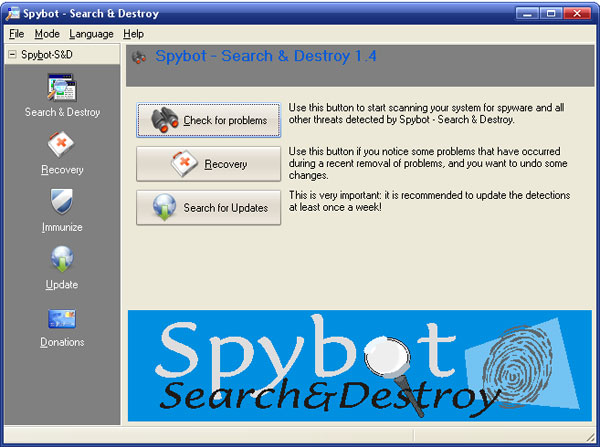
Spybot Search & Destroy

I just wanted to talk about a really cool free program that I personally use to keep my computer from getting spyware. the program is called spybot S&D.
This program it useful in many ways....

it has a passive blocking on known problems in your web browsers... for IE and for Firefox etc.
it also has a file shredder.... with a few nice temples for easy shredding of your temporary files.

this program has always helped me get ride of spyware and adware on computers i fix. It is one the easiest programs to use as you do not really need to do much. when you first start the program it will ask you to make a backup of your registry so that if you remove something that was not supposed to... it will help you fix that. i use the program on the advance settings which gives me the options to look at the startup programs and also problems in the registry where there are entries that are pointing somewhere but there is no file there (which can be used by spyware and viruses). to help you deat it.

There is also a program called teatimer that is a little more complicated to work with for someone that does not know much about computers... that or is scared of everything on the computer. what it does is block everything trying to edit the registry till it asks you to let it or not.
So if you where installing a program fom a dvd that you bought from the store it will probably pop up saying that it is the spacific file is trying to edit the registry... this is one of the times you would say yes and let it edit it...
though if you where browsing the web and what not and it just randomly pops up when you go to a website. then that may be an indication of something bad trying to edit it.

you do not have to install teatimer if you do not want to though it does help keep the computer a lot safer but can annoy some users where they just start clicking yes on everything which defeats the point of having it.

well there is a little bit about spybot i hope some of you download it and install it to give it a try.